Refund a student
Offer refunds, choose which courses and for how long, and refund a student.
Refunds are up to you. They are off unless you switch them on, and even then you decide which courses they apply to, for how many days, and whether to refund a particular student.
Before you start
- Your academy must sell Online, through Paatya. See Set up course payments.
- Think about which courses to refund. A student can finish some courses in a day and then ask for their money back, so you may want to leave those out.
Offer refunds
- In the left menu, click Payments, then the Setup tab.
- Under 4 Refunds, switch on Offer refunds.
- Enter the Refund period: how many days after paying a student can be refunded.
- Click Save.
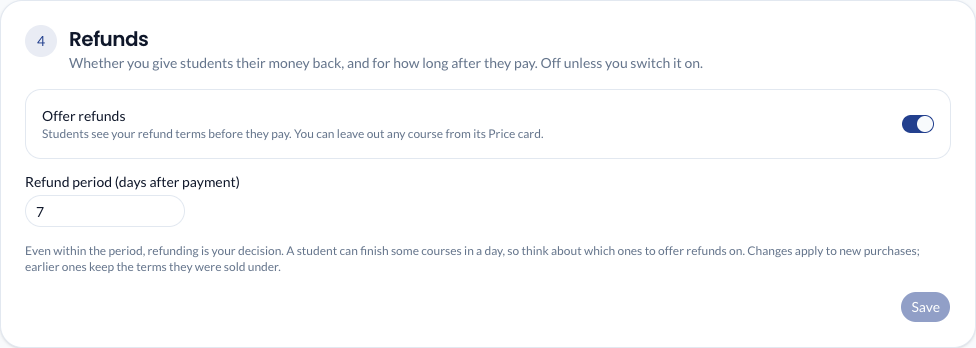
Every paid course is then refundable. To leave one out, open the course, switch off Refunds within … days on its Price card, and click Save price.
Students see the terms before they pay ("Refundable within 7 days of payment" or "Not refundable") on your website, at checkout and on their receipt.
Changing your terms affects only new purchases. A student keeps the terms they paid under. If you switch refunds off, someone who bought with a 7-day refund can still be refunded within those 7 days.
Refund a student
- In the left menu, click Payments, then the Transactions tab.
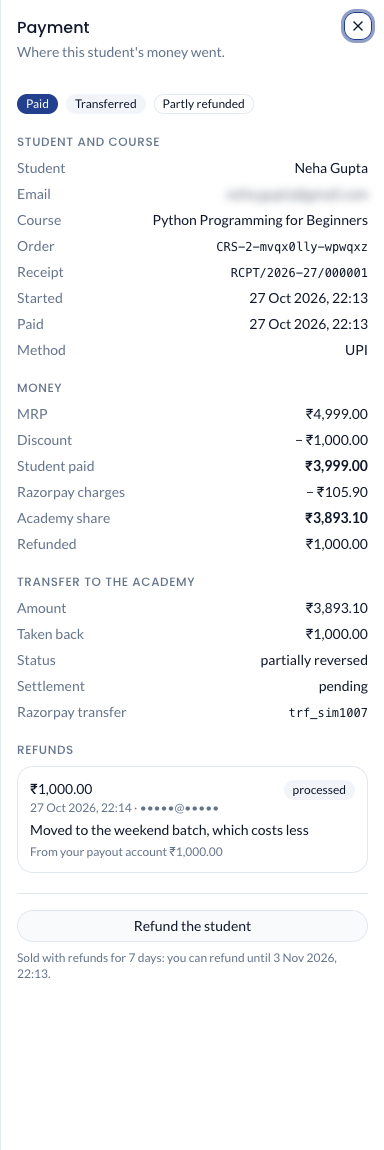
- Click the payment. It shows the date the refund period ends, or says the course was sold without refunds.
- Click Refund the student. This button shows only while the payment can be refunded.
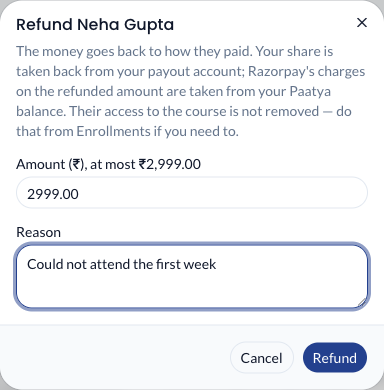
- Leave the amount as it is to refund everything that's left, or type a smaller amount. Then write the reason.
- Click Refund.
What you'll see
-
The payment shows Refunded or Partly refunded, and the refund is listed under Refunds with where the money came from.
-
The student gets the money back the way they paid, usually within 5 to 7 working days.
Refunding does not remove the student from the course. To take the course away too, do it from Enrollments.
Who pays for a refund
- Your part of the refund is taken back from your payout account.
- On a fixed plan, Paatya's commission on the refunded part is returned, unless Paatya's rules say otherwise. On pay-as-you-go there is no Paatya fee to return.
- Razorpay does not give back its own charges on a refund. Whatever your share can't cover is taken from your academy's Paatya balance, and shows under Usage & Billing → Transactions as an adjustment.