Refer & earn
Earn credit when academies you invite make their first payment.
Invite other trainers and institutes to Paatya. When an academy you refer makes its first payment, ₹100 of credit is added to your balance.
Before you start
- Any admin in your academy can share the link.
- Rewards are paid only for academies that sign up through your link and then pay online.
Share your link
- In the left menu, click Refer & earn.
- Under Your referral link, click Copy link, then paste it wherever you like.
- Or click one of the buttons under the link to share it straight to WhatsApp, Facebook, X, LinkedIn, Telegram or Email. On a phone, Share opens your phone's own share menu.
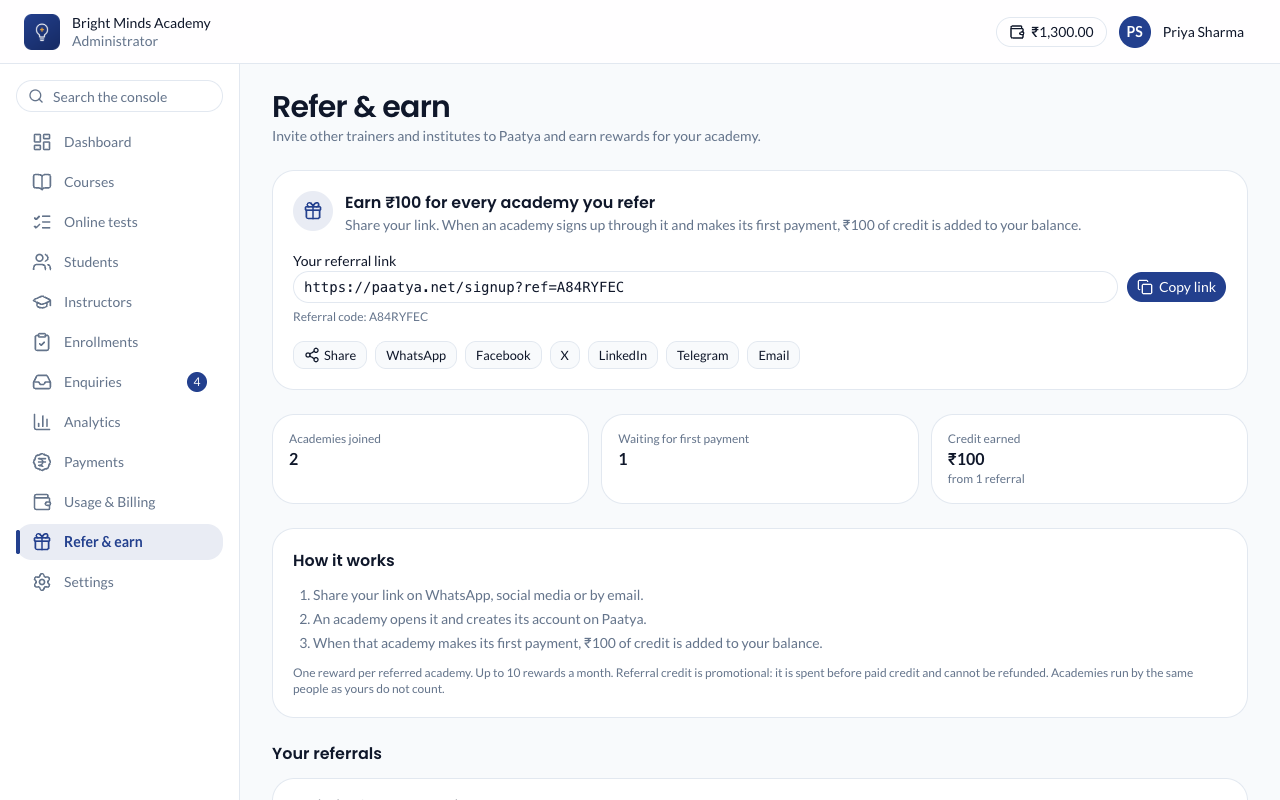
You can also copy or share the link from the Refer & earn card on your dashboard.
Your link looks like https://paatya.net/signup?ref=AB12CD34. Whoever opens it lands on the Create your academy page, which says your academy invited them.
What you'll see
Under Your referrals, each academy that signed up through your link is listed with its status:
| Status | What it means |
|---|---|
| Waiting for first payment | It has signed up but hasn't recharged yet. |
| Rewarded | It made its first payment, and the reward was added to your balance. |
| Monthly limit reached | It paid, but your academy had already earned the most rewards allowed that month. |
| Not eligible | No reward, for example because it's run by the same people as your academy. |
The reward shows under Usage & Billing → Transactions as Referral reward, with the name of the academy that paid.
Rules
- One reward per referred academy, however many times it pays.
- The reward is paid on its first successful online payment. Balance added by the Paatya team doesn't count.
- Your academy can earn up to a set number of rewards each calendar month. The limit is shown on the Refer & earn page.
- No reward for an academy run by the same people as yours: the same email address or mobile number as one of your admins.
- Your academy must be active when the referred academy pays.
- Referral credit is promotional: it is used before the credit you paid for, and it can't be refunded.
If something goes wrong
- The new academy isn't in your list. It must open your link and create the academy in the same browser tab or window. Ask them to sign up through the link again only if they haven't created their academy yet; an academy can't be added to your list afterwards.
- There's no link on the page. Refer & earn is paused for now. Referrals you already made are still rewarded when they pay, unless it is still paused at that moment.