Web address and domain
Your academy's address, and using your own domain.
Every academy has its own web address, where your students sign in and visitors see your public page. You can also use a domain you own, such as brightminds.com or learn.brightminds.com, and set it up yourself under Settings → Domain.
Your academy's address
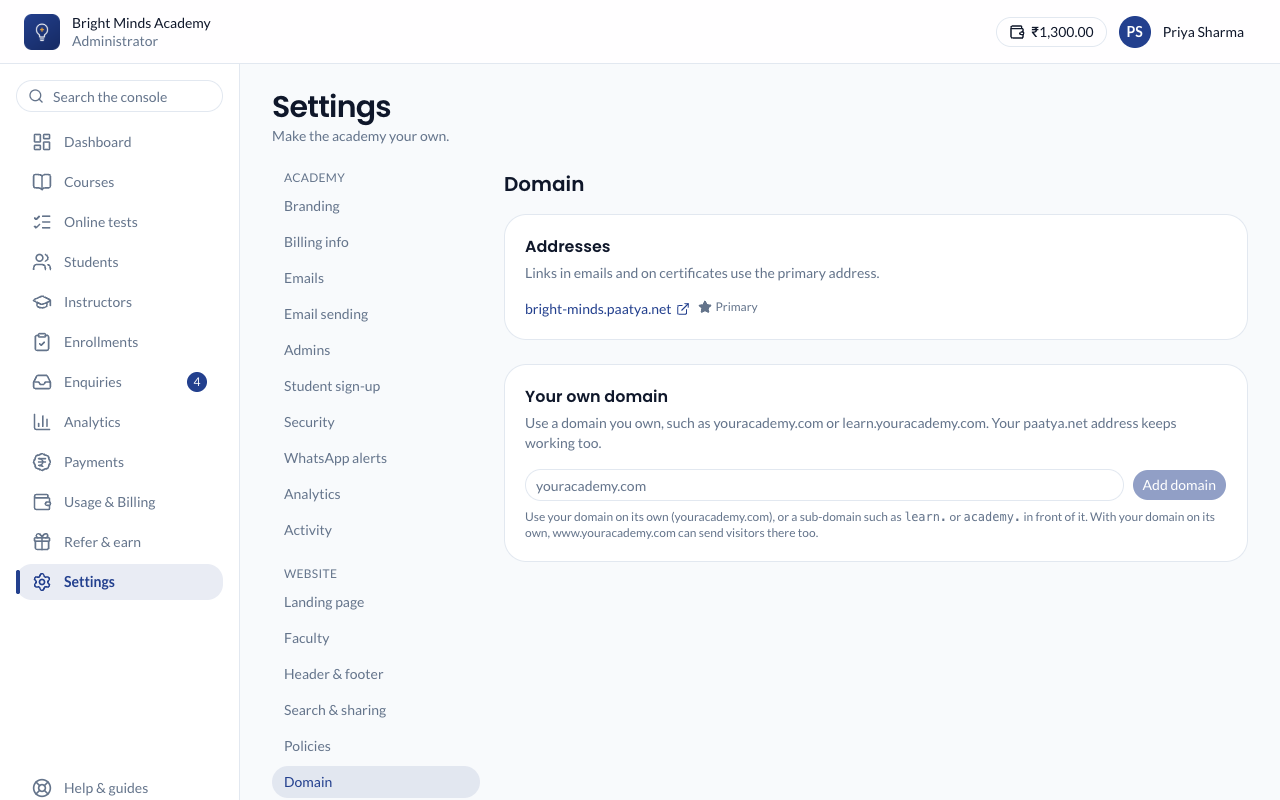
You chose your address when you created the academy, for example bright-minds.paatya.net. To see it:
- In the left menu, click Settings.
- In the settings menu, under Website, click Domain.
The Addresses panel lists your academy's addresses. The one marked Primary is used in the links in your emails and on certificates.
Note: You cannot change your
paatya.netaddress yourself. If you really need a different one, email support@paatya.net.
Use your own domain
You can use a domain you already own, either on its own (brightminds.com) or a sub-domain of it (learn.brightminds.com). Your students then sign in there, and your paatya.net address keeps working too.
Before you start
- You own a domain and can sign in to where it is managed (your "DNS provider"), such as GoDaddy, Hostinger or Cloudflare.
- Choose whether to use the domain itself (
brightminds.com) or a sub-domain such aslearn.oracademy.. If the domain already runs another website, use a sub-domain so that website keeps working.
Steps
-
In the left menu, click Settings, then Domain under Website.
-
Under Your own domain, type the domain you want to use, such as
learn.brightminds.com, and click Add domain. -
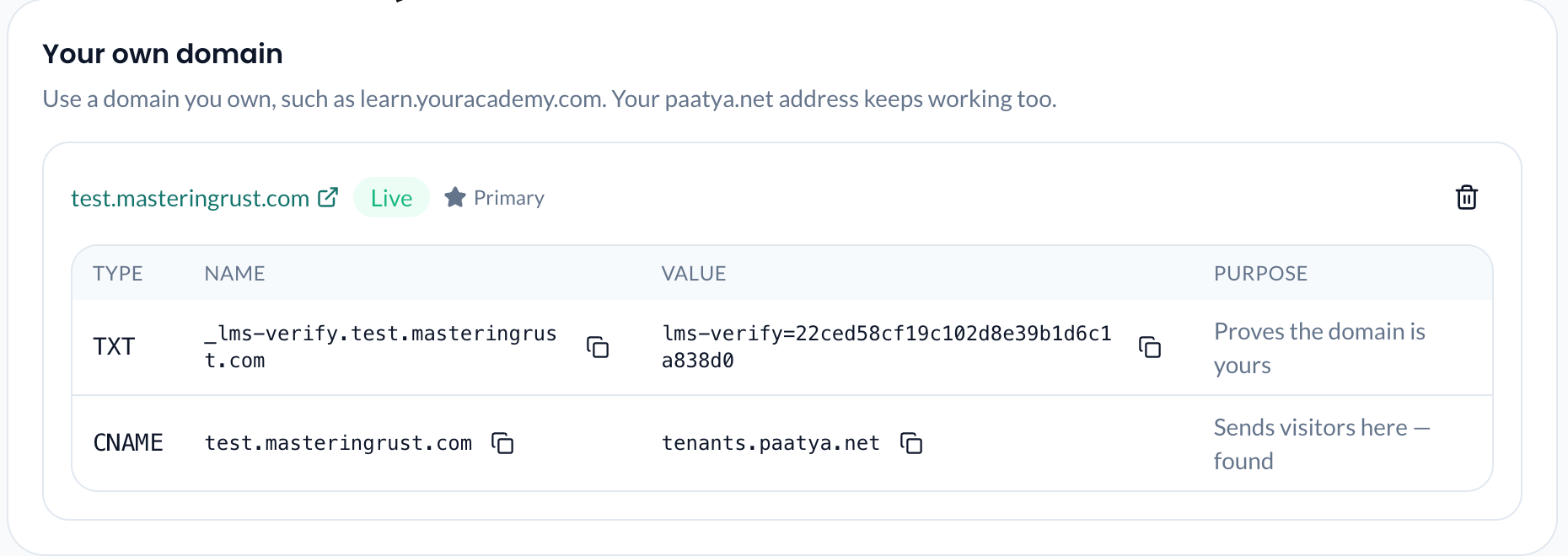
Paatya shows two records:
- a TXT record, which proves the domain is yours;
- a CNAME record, which sends visitors to your academy. For a domain on its own, such as
brightminds.com, this is an A record instead, because a domain on its own can't have a CNAME record.
-
Sign in to your DNS provider and create both records exactly as shown. Use the copy buttons to avoid typing mistakes. If you use Cloudflare, set the CNAME or A record to DNS only (grey cloud).
-
Wait. Paatya checks the records every 10 minutes, or click Check now. DNS changes usually show within minutes, but can take up to a day to reach everyone.
Once both records are found, Paatya sets up the secure certificate (https) by itself, usually within a few minutes. Your domain then becomes the Primary address, so links in your emails and on certificates use it.
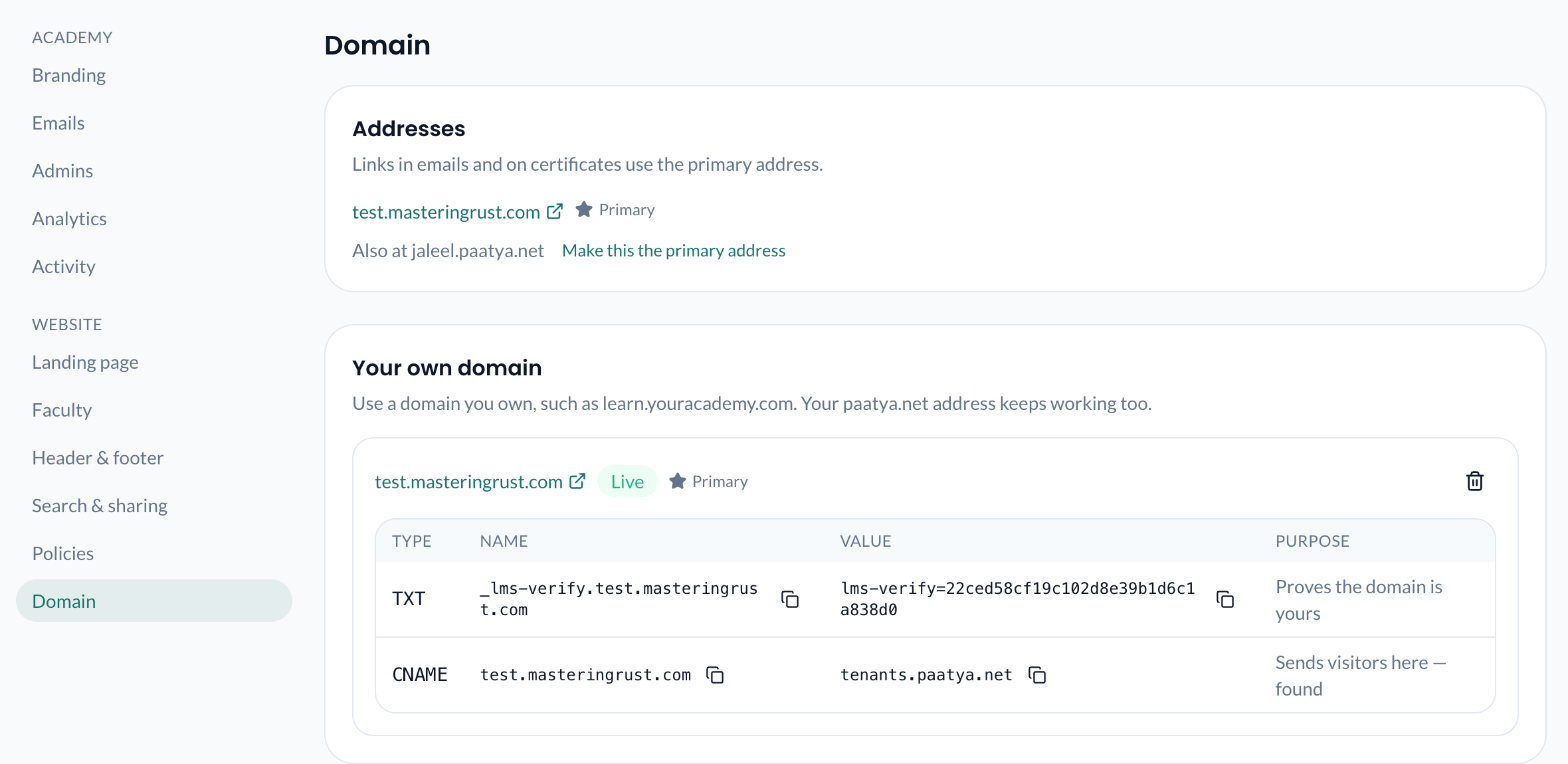
Tip: Nothing needs to be done on Paatya's side once the records are in. When we tried it with a GoDaddy domain, the domain was Live, with https, about six minutes after the records were added.
Example: adding the records at GoDaddy
Most DNS providers work the same way. At GoDaddy, for the domain learn.brightminds.com:
- Sign in to GoDaddy, open My Products, and click DNS next to
brightminds.com. - Click Add New Record, choose TXT, and enter:
- Name:
_lms-verify.learn. GoDaddy adds.brightminds.comitself, so type only the part before it. - Value: the value Paatya shows, starting
lms-verify=.
- Name:
- Click Add New Record again, choose CNAME, and enter:
- Name:
learn - Value: the value Paatya shows under CNAME (
tenants.paatya.net).
- Name:
- Save. Back in Paatya, click Check now after a few minutes.
Example: using the domain on its own at GoDaddy
For brightminds.com itself:
- Open DNS next to
brightminds.com, as above. - Add a TXT record with Name
_lms-verifyand the value Paatya shows. - Find the existing A record named
@(GoDaddy adds one for its parking page). Edit it so its Value is the address Paatya shows under A. Delete any other A or AAAA records named@. - Save, then click Check now in Paatya after a few minutes.
Note: GoDaddy's Forwarding for the domain also changes the
@record. Turn forwarding off first.
www. for a domain on its own
When you use a domain on its own, such as brightminds.com, Paatya also shows an optional CNAME record for www.brightminds.com. Add it, and visitors who type www.brightminds.com are sent on to brightminds.com. The www. address gets its own secure certificate, so the move happens over https too. Your academy itself always opens at brightminds.com, never at www..
- At your DNS provider, add a CNAME record with Name
wwwand the value Paatya shows (tenants.paatya.net). - Save. Nothing else needs proving: the
www.address sits under the domain you have already verified.
At GoDaddy the www CNAME usually exists already, pointing to @; that works as it is. If it points anywhere else, change it to the value Paatya shows.
The line for www. reads Optional: sends www.brightminds.com to brightminds.com, followed by:
- found, securing: the record is in, and the certificate is being set up;
- live:
www.brightminds.comnow sends visitors tobrightminds.com; - currently and another address:
wwwstill points somewhere else, such as an old website. Change or delete that record; - the certificate could not be issued yet: Paatya tries again every hour. The reason is shown after it.
Note: This only applies to a domain on its own. A sub-domain such as
learn.brightminds.comhas nowww.line.
Note: If your sub-domain already has a record, such as an A record for
learnpointing to an old website, delete it first. A name can have a CNAME record or other records, not both.
Note: You can use one domain of your own. To switch to a different one, remove the current domain first.
What you'll see
The status next to your domain changes:
| Status | What it means |
|---|---|
| Waiting for DNS | The TXT record hasn't been found yet. Check it and wait a little longer. |
| Securing | The domain is yours. The secure certificate is being set up; this needs the CNAME record too. |
| Live | Your academy opens at your domain. |
| Not verified | The TXT record was not found within 72 hours. Check it, then click Check now. |
| Disabled | The TXT record was missing for 7 days, so the domain was switched off. Put the record back and click Check now. |
Choose which address is primary
- To put links back on your
paatya.netaddress, click Make this the primary address next to it under Addresses. - To use your own domain again, click Make primary next to it.
Remove your domain
Click the bin icon next to your domain, then Remove. Your academy stops opening there within a few minutes. Your paatya.net address keeps working. You can then delete the two records at your DNS provider.
If something goes wrong
- The status stays Waiting for DNS for a day or more. Compare each record with your DNS provider, character by character. Some providers add your domain to the end of the name automatically, so
learn.brightminds.combecomeslearn.brightminds.com.brightminds.com. If so, enter onlylearnas the name. - The status stays Securing. Look at the CNAME line. If it says "currently" followed by another address, your sub-domain still points somewhere else: remove the old record at your DNS provider. For a domain on its own, the A line lists every address found; it must show only Paatya's, so delete the others, including any AAAA record. If a reason is shown under the status, the certificate is tried again every hour.
- Your old address still appears in emails. Links use the Primary address. Make your domain primary under Settings → Domain.