The getting-started checklist
The checklist on your dashboard, step by step.
Your dashboard shows a checklist called Get your academy going until your academy is set up. Each step ticks itself off when you have done it, so there is nothing to tick by hand. When every step is done, the checklist disappears.
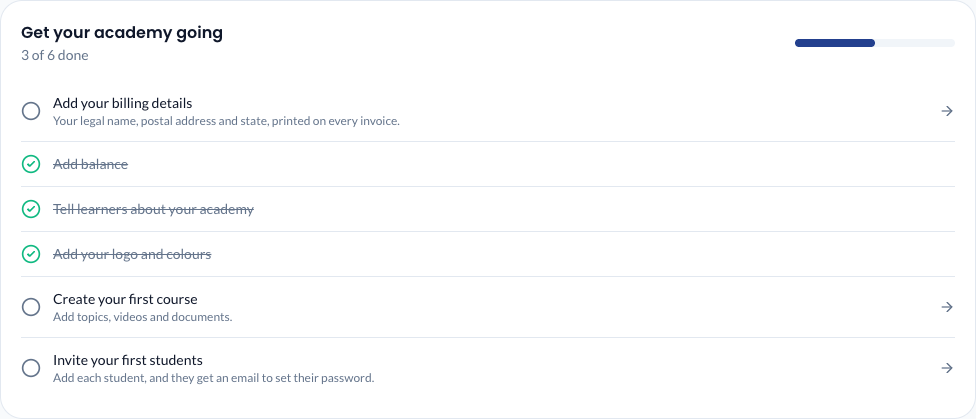
The six steps
Click any step to go straight to the right screen.
| Step | What it means | Where it takes you |
|---|---|---|
| Add your billing details | Your legal name, postal address and state, printed on every invoice. Do this before your first recharge so that invoice carries them too. | Settings → Billing info (the same form as Usage & Billing → Billing details). See Add balance. |
| Add balance | Make your first recharge. The welcome credit doesn't tick this step. When a first-recharge bonus is on offer, the step says how much extra credit you get. | Usage & Billing → Recharge. See Add balance. |
| Tell learners about your academy | A short description, a contact number and a welcome message for your sign-in page. | The setup wizard. See The setup wizard. |
| Add your logo and colours | Make the academy look like yours. | Settings → Branding. See Branding. |
| Create your first course | Add a course with topics, videos and documents. | Courses → Create Course. See Create a course. |
| Invite your first students | Add students so they can sign in. | Students. See Add a student. |
The line under the title, such as "2 of 6 done", shows your progress.
When is a step done?
- Add your billing details: once the legal name, postal address and state are all filled in and saved. The GSTIN is optional and doesn't count.
- Add balance: after your first successful recharge.
- Tell learners about your academy: once your academy has a description.
- Add your logo and colours: once you have uploaded a logo or chosen a brand colour.
- Create your first course: once any course exists, even a draft.
- Invite your first students: once you have added at least one student.
If something goes wrong
- A step stays unticked after you did it. Refresh the page. For Add your billing details, check that all three of legal name, postal address and state are filled in. For Tell learners about your academy, make sure What does your academy teach? is filled in and saved.
- The checklist has gone. That means every step is done. You can still change everything from Settings.